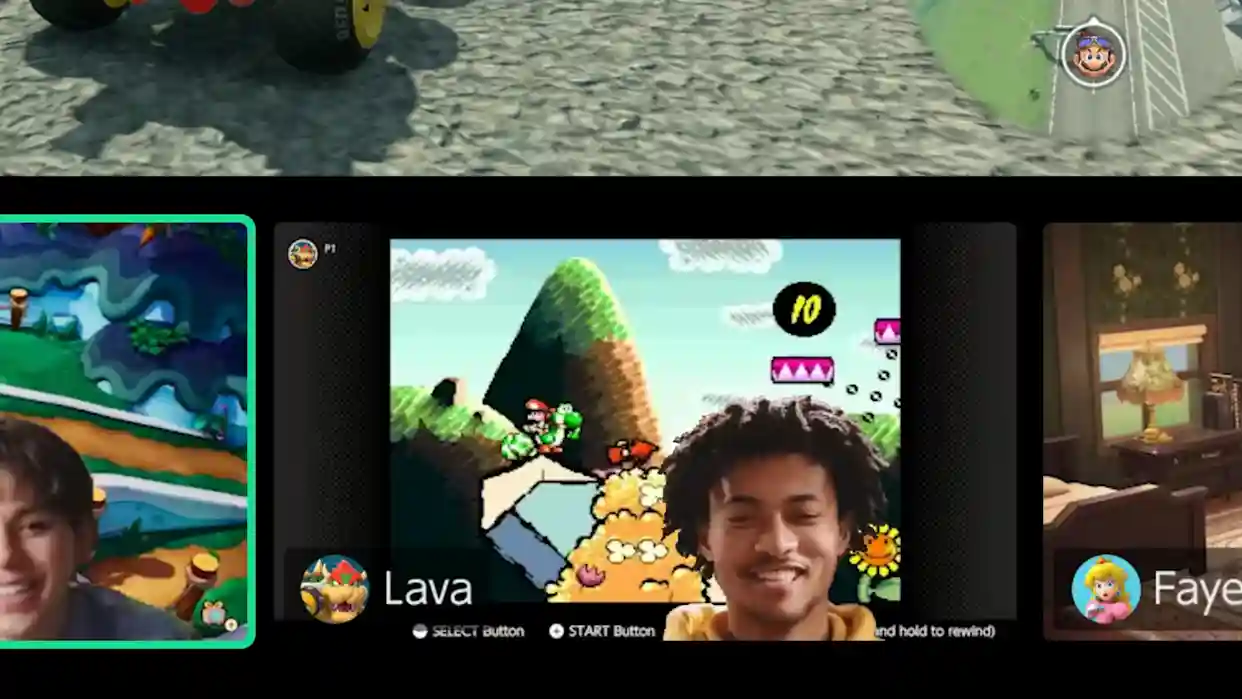
Google Pixel owners gain a game-changing feature: use your smartphone as a high-quality external webcam for Nintendo Switch 2’s GameChat video calls, eliminating bulky accessories with native USB-C integration. This breakthrough, enabled by November’s Pixel Drop update, leverages Android 14’s UVC (USB Video Class) support refined for console compatibility—no third-party apps required. Switch 2’s camera-less design demanded workarounds; Pixels deliver 12MP front-facing excellence with zero latency, perfect for multiplayer sessions.
November Pixel Drop Unlocks Console Magic
Android’s webcam mode debuted in 2023’s Q4 Pixel update, but Switch 2 compatibility materialized post-November firmware. Pre-update Pixels failed detection; post-installation, instant pairing. Release notes explicitly address “webcam mode fixes for connected devices,” confirming intentional enhancement. December updates maintain stability, positioning Pixels as premier Nintendo peripherals alongside Joy-Cons.
Hands-on tests across Pixel 9 Pro, 8 Pro, and 7 series yield flawless 1080p/30fps streams with auto-focus, exposure correction, and portrait stabilization. Switch 2’s USB-C dock supplies power, enabling hours-long calls without drainage—ideal for LAN parties or remote play.
Step-by-Step Pixel-to-Switch 2 Webcam Activation
- Ensure Pixel runs November 2025 or later firmware via Settings > System > System Update.
- Connect Pixel to Switch 2 dock/base station using high-quality USB-C cable (data-capable, not charge-only).
- On Pixel: Pull down notification shade > tap “Charging this device via USB” > select “Webcam” or “UVC” mode.
- Switch 2 auto-detects camera; grant permissions in GameChat settings if prompted.
- Position phone via flexible mount or tripod; enable front-facing in Pixel Camera app for optimal angle.
- Test via GameChat preview—adjust brightness/exposure via Pixel quick settings.
Pixel Advantages Over Dedicated Switch 2 Cams
Third-party Nintendo-licensed webcams cost $50-100 with middling 720p sensors; Pixels repurpose premium hardware:
- Superior optics: 12MP ultra-wide selfies with Night Sight for low-light dorms.
- AI enhancements: Face Unblur, Real Tone for accurate skin rendering across ethnicities.
- Zero added bulk—dock phone alongside controllers for tidy setups.
- Multi-use: webcam doubles as streaming source for Twitch/OBS via USB.
- Future-proof: OTA updates add C2PA verification, portrait mode, AR overlays.
GameChat’s dual-screen layout displays friends’ feeds above gameplay, minimizing HUD obstruction. Pixel’s computational photography ensures crisp feeds even in party lighting chaos.
Broader Implications for Android Gaming Ecosystem
This fusion blurs phone/console boundaries, previewing UVC standardization across Android handhelds (ROG Ally, Legion Go). Samsung Galaxy users await One UI 7 parity; iPhone Lightning-to-USB-C adapters lag. Nintendo’s open-camera policy spurs innovation—expect Steam Deck webcam apps and PS5 USB camera rivals.
For esports hopefuls, Pixel webcam elevates Smash Bros. Ultimate streams with 4K photo bursts mid-match. Parents appreciate kid-safe positioning without permanent fixtures. As Switch 2’s library expands (Zelda, Mario Kart successor imminent), Pixel integration cements Google as Nintendo’s unspoken hardware ally—delivering pro-grade video where official cams falter.