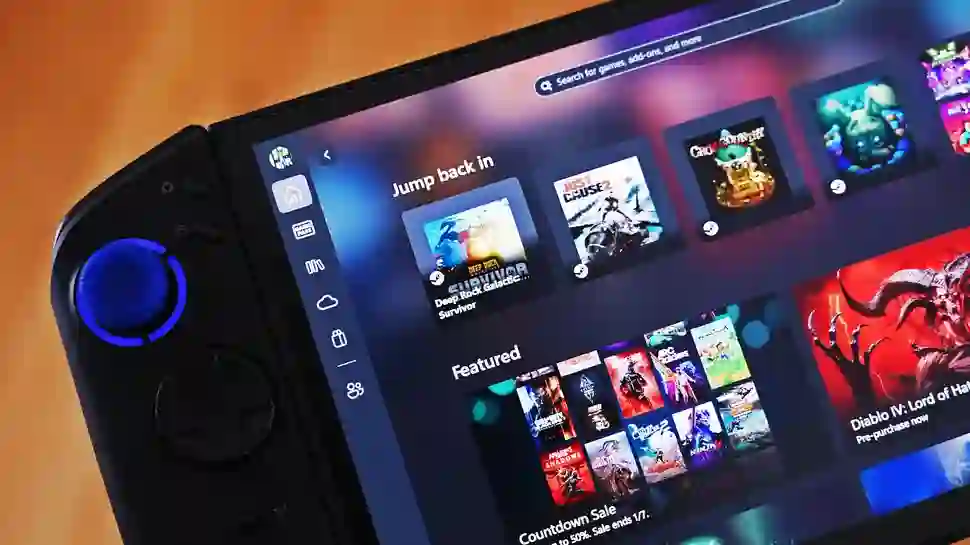
Lenovo continues refining its popular Legion Go handheld gaming lineup with a significant Legion Space software update that brings native optimization for Microsoft’s Xbox Full Screen Experience. This version 1.3.4.9 release aligns Lenovo’s devices more closely with the Xbox Ally’s seamless controller-optimized interface, delivering performance improvements, intuitive quick settings access, and Xbox ecosystem integration previously exclusive to Microsoft’s branded handheld. The update rolls out across original Legion Go, Legion Go S, and Legion Go 2 models.
Seamless Xbox Full Screen Experience Integration
The update introduces a dedicated quick toggle for Xbox Full Screen Experience directly within Legion Space and its overlay widget, eliminating manual Windows Settings navigation. When activated, Legion devices automatically register as “handheld” in Windows, triggering optimized resource allocation, background process suspension, and controller-focused UI scaling that transforms clunky desktop navigation into fluid console-style operation.
Legion Space now embeds within the Xbox Game Bar itself, providing instant access to performance modes, RGB lighting customization, vibration intensity adjustment, and display settings without exiting gameplay. This deep integration mirrors Xbox Ally functionality while preserving Lenovo’s unique hardware controls and feature set, creating unified handheld experience across competing brands.
Enhanced Control Mapping and Accessibility
Refined button behaviors improve daily usability significantly. A short press of the Legion R button retains quick Legion Space widget access for essential adjustments, while a long press now triggers Windows Task View—equivalent to Win+Tab—for seamless multitasking and virtual desktop switching. This dual-function approach maximizes the Legion R button’s utility without requiring additional key remapping.
Performance overlays display real-time metrics optimized for handheld form factors, including TDP limits, thermal throttling status, and battery optimization modes tailored specifically for Xbox Full Screen Experience workloads. Users gain granular control over fan curves, screen refresh rates, and power profiles directly from controller-accessible menus, rivaling dedicated console quick menus.
Why Xbox Full Screen Experience Matters
Microsoft’s Xbox Full Screen Experience fundamentally reimagines Windows 11 for handheld gaming by replacing traditional desktop environments with a controller-optimized Xbox app interface. Games from PC libraries, Xbox Game Pass, Epic Games Store, and cloud streaming services unify within a single, console-like experience that eliminates Windows desktop friction entirely.
Resource optimization proves particularly beneficial for AMD-powered Legion Go devices. Background processes suspend automatically, memory allocation prioritizes active games, and display scaling adapts dynamically to handheld resolutions. Xbox ecosystem integration delivers seamless Game Pass discovery, cloud saves, and cross-progression without browser navigation or desktop clutter.
Staged Rollout Across Legion Lineup
Lenovo adopts a phased deployment strategy ensuring stability across diverse hardware configurations. Original Legion Go models receive optimizations for their detachable controllers and 8.8-inch displays, while Legion Go S and Go 2 benefit from next-generation AMD Z2 architecture tuning. Firmware consistency maintains identical FSE performance characteristics regardless of model generation.
User feedback from early recipients confirms tangible improvements in launch times, menu responsiveness, and thermal management during extended sessions. Battery life extends noticeably through intelligent power gating of unused display zones and wireless peripherals when FSE activates. The update positions all Legion Go variants as first-class Xbox ecosystem citizens competitive with purpose-built Xbox Ally hardware.
Competitive Handheld Gaming Landscape
This development intensifies competition within Windows handheld gaming. Lenovo matches Xbox Ally’s ecosystem optimizations while retaining superior display specifications, detachable controllers, and aggressive pricing. ASUS ROG Ally and MSI Claw users await similar manufacturer support, though Lenovo establishes early leadership in FSE adoption.
Microsoft benefits from broader hardware compatibility, accelerating Xbox Full Screen Experience maturation through real-world testing across diverse AMD APUs and thermal designs. 2026 roadmap hints at native FSE controller profiles, haptic feedback integration, and spatial audio optimizations exclusive to participating OEM devices.
Practical Setup and Usage Tips
Installation requires enabling Xbox Full Screen Experience through Windows Settings > Gaming > Xbox Full Screen Experience, followed by Legion Space update notification acceptance. Users should calibrate TDP limits and fan curves post-installation for optimal balance between performance and thermals specific to individual game libraries.
Controller remapping proves unnecessary due to Microsoft’s universal gamepad profiles combined with Lenovo’s hardware-specific optimizations. Quick resume functionality preserves game states across Legion Space overlays and FSE toggling, while Xbox Cloud Gaming integration enables instant streaming of console exclusives without local storage requirements.
Future Development Roadmap
Lenovo’s rapid FSE support signals deeper Microsoft collaboration ahead. Legion Go 2 firmware previews suggest native FSE installation wizards, automated driver optimization, and cloud-based profile syncing across multiple devices. Integration with Windows Subsystem for Android promises mobile game streaming, while rumored Legion Go 3 hardware may ship FSE-enabled from factory.
Microsoft plans substantial 2026 enhancements including spatial computing gestures, eye-tracking foveated rendering, and AI-driven performance scaling. Lenovo’s early adoption positions Legion Go owners at forefront of handheld Windows evolution, transforming versatile PC gaming devices into legitimate Xbox console alternatives without sacrificing PC versatility.