
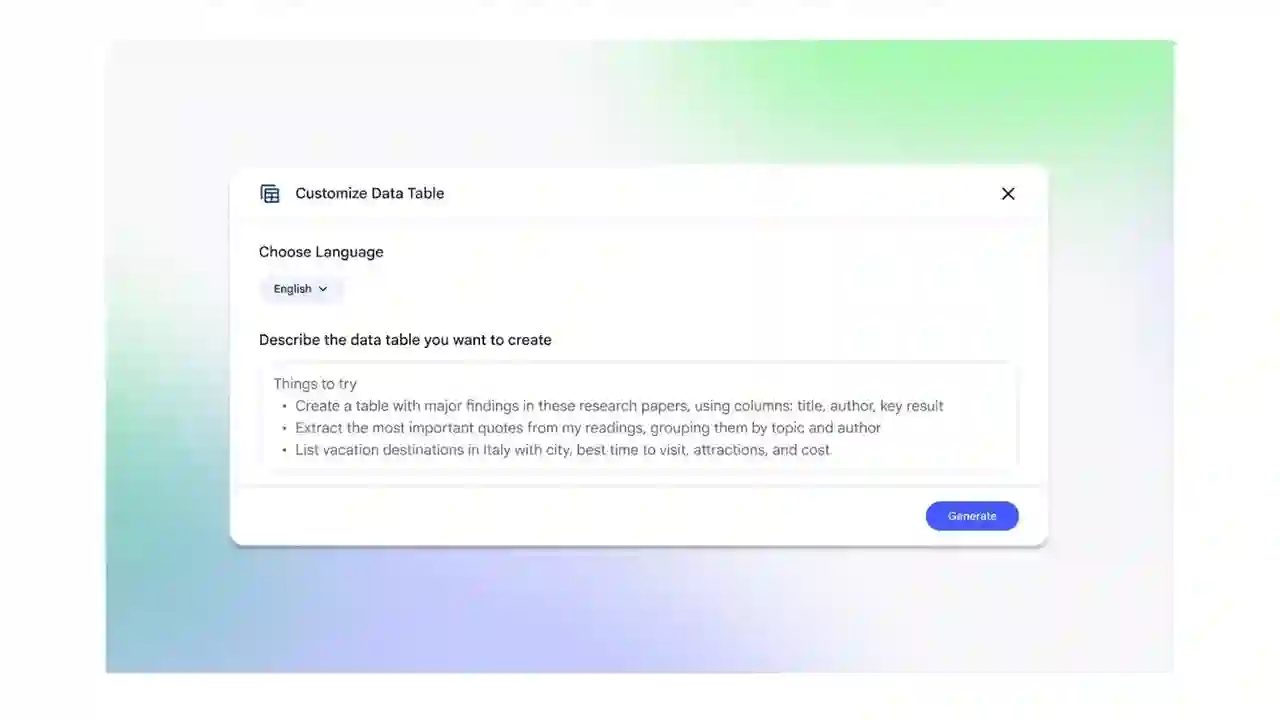
Google’s NotebookLM, the AI-powered research and note-taking platform, has launched a powerful new feature called Data Tables, enabling users to automatically generate structured charts from scattered information across multiple sources. This addition transforms raw notes, documents, and web clippings into exportable spreadsheets compatible with Google Sheets, streamlining data organization for researchers, students, and professionals. Available immediately to Pro and Ultra subscribers with a broader rollout planned over the coming weeks, Data Tables responds to natural language prompts to synthesize complex datasets into clear, customizable visualizations.
The feature excels at tackling disorganized information, a common pain point in knowledge work. Users can instruct NotebookLM to “create a price comparison table from these product reviews” or “aggregate survey results into a performance chart,” and the AI pulls relevant data points, categorizes them, and formats professional-looking tables. Headers, rows, columns, and even formulas populate automatically, with options for sorting, filtering, and styling. Export functionality ensures seamless integration into workflows, allowing direct Sheets imports for further analysis, collaboration, or presentations. This bridges the gap between qualitative research and quantitative insights, saving hours of manual data entry.
Building on recent enhancements like Deep Research mode introduced last month, Data Tables elevates NotebookLM’s utility for in-depth projects. Deep Research, originally debuted in Gemini late last year, handles multi-step investigations by browsing the web, synthesizing findings, and generating comprehensive reports. Combined with Data Tables, it creates a robust toolkit: gather insights autonomously, then tabularize key metrics for decision-making. Practical applications span industries—from journalists compiling election data to marketers tracking competitor pricing or academics summarizing experimental results.
NotebookLM’s evolution reflects Google’s push toward “ambient computing,” where AI anticipates user needs without rigid templates. Unlike traditional spreadsheet tools requiring predefined structures, Data Tables infers schemas from context, adapting to ambiguous inputs like “compare electric vehicle ranges and prices from these articles.” Visual previews allow real-time refinements, such as adding calculated columns for averages or growth rates. Privacy-conscious design keeps processing within Google’s secure ecosystem, with user-controlled data retention.
### Key Use Cases for Data Tables
Professionals and creators can leverage this feature across diverse scenarios. Pricing analysts build competitive matrices from scattered e-commerce data. Content creators organize podcast guest stats or YouTube analytics into shareable formats. Students transform literature reviews into evidence tables for theses. Businesses aggregate sales pipelines from emails and CRMs into forecast dashboards.
### Comparison: NotebookLM Data Tables vs Traditional Tools
NotebookLM stands out for accessibility, outpacing manual tools in speed while rivaling enterprise solutions in intelligence.
### Getting Started with Data Tables
– Upload sources (PDFs, notes, URLs) to a new Notebook.
– Type a prompt like “Build a comparison table of [topic] specs.”
– Review AI-generated table, edit columns via chat.
– Customize with sorts, filters, or computed fields.
– Export directly to Sheets for team sharing.
### Future Potential and Integrations
As NotebookLM matures, Data Tables could expand to real-time web scraping, API feeds, or multi-notebook consolidation. Imagine live dashboards pulling stock prices or weather data into dynamic charts. Voice activation via Gemini integration would enable hands-free creation during meetings. Enterprise versions might add role-based access and audit trails for compliance-heavy fields.
This launch cements NotebookLM as a frontrunner in AI-assisted productivity, challenging Notion’s databases and Airtable’s automations with superior synthesis. Free tier access soon democratizes advanced tools, empowering solo creators against data giants. For knowledge workers drowning in information, Data Tables offers a lifeline—turning chaos into clarity with conversational ease. Google’s bet on agentic AI pays off here, proving research platforms can evolve into indispensable collaborators.