
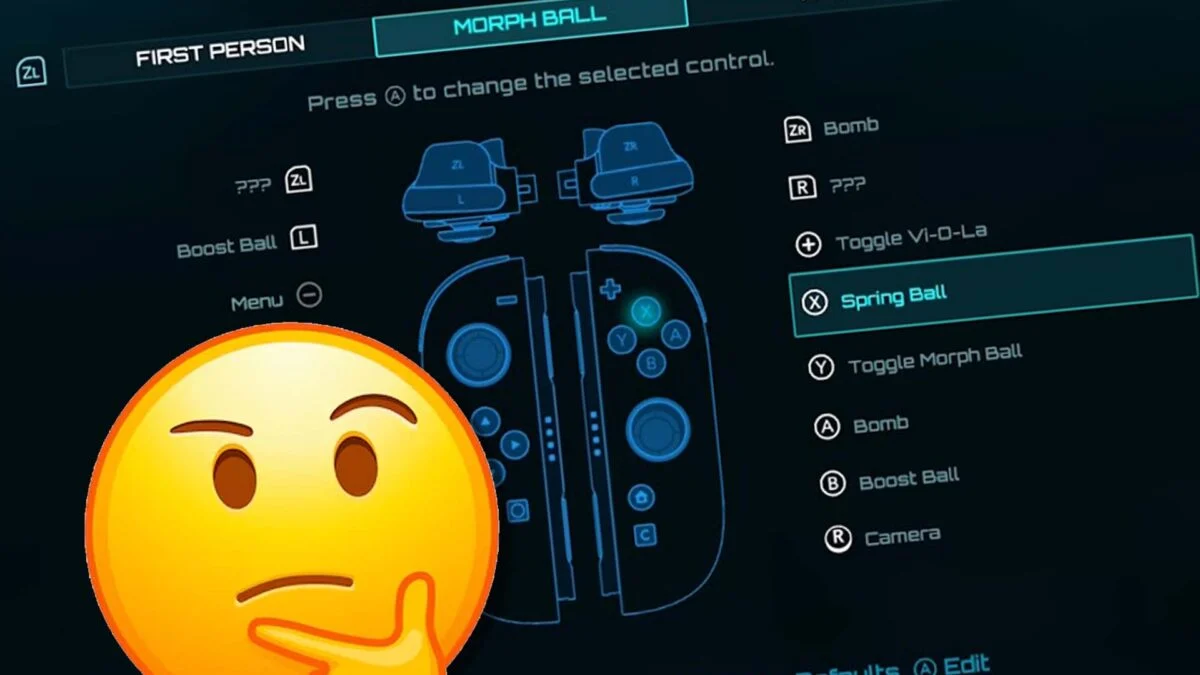
Metroid Prime 4: Beyond delivers stunning exploration and combat on Nintendo Switch and Switch 2, but its default Morph Ball controls frustrate many players. The Morph Ball jump defaults to the X button, separate from the B button used for Samus’ regular jumps. This inconsistency disrupts muscle memory, especially for veterans of previous Metroid titles.
This design choice carries over from Metroid Prime Remastered and older entries like the Wii version of Prime 2. While some players adapt quickly, others find it jarring during intense platforming sequences. Fortunately, Retro Studios included full control remapping with a few extra steps to access advanced options.
Why the Default Controls Feel Off
Seamless transitions between Samus’ bipedal movement and Morph Ball rolling define Metroid Prime’s fluid exploration. When jumping requires different buttons, players fumble during tight maneuvers through ventilation shafts or bombable passages. The separation breaks immersion, turning precise navigation into a constant reminder of menu-diving necessity.
Modern gamers expect customizable schemes, particularly in first-person adventures demanding split-second inputs. Prime 4’s commitment to accessibility shines through its hidden remapping tools, rewarding persistent explorers who seek optimal setups.
Step-by-Step Guide to Remap Morph Ball Jump
Follow these precise steps to unify jumping under the B button across all modes.
– Pause the game and enter the Settings menu.
– Scroll to the Control Scheme subsection and press A to open it.
– Press ZR to access Morph Ball Controls.
– Select “Spring Ball” and press A to edit.
– Highlight the B button slot and confirm the assignment.
Handling the Mysterious ??? Button Assignment
Some configurations show question marks (???) in the B button slot, representing the later-unlocked Spin Ball ability. This placeholder requires advanced mode activation.
– When prompted after the swap attempt, select “OK” to enter Advanced Mode.
– Remap the ??? slot to your preferred secondary action.
– Exit menus and test in a safe area like the starting hub.
These changes apply universally across Switch and Switch 2, persisting through saves and sessions.
Advanced Control Customization Tips
Beyond basic jumps, Prime 4 offers extensive remapping for optimal comfort.
– Invert camera axes independently for horizontal and vertical movement.
– Adjust aim sensitivity curves for precise scanning and shooting.
– Rebind Morph Ball bomb placement to a more accessible face button.
– Set toggle vs. hold preferences for lock-on targeting.
– Experiment with radial menus for quick visor and beam switches.
Warning screens appear for non-standard schemes, but they pose no risk to progression or achievements. Save your custom profile before expeditions to avoid accidental resets.
Testing Your New Setup in Prime 4
Load a familiar area like the Volt Forge or early titan encounters to verify responsiveness. Morph Ball sections now flow naturally—boost jumps chain seamlessly into scans and scans without awkward thumb shifts. Tight corridors that once caused repeated deaths become playgrounds for speedrunning attempts.
Community feedback highlights this tweak as transformative for accessibility. Players with motor challenges or controller preferences report dramatically improved completion rates post-remap.
The Bigger Picture of Prime 4 Controls
Metroid Prime 4: Beyond refines the series formula with gyro aiming, haptic feedback, and dual-stick precision tailored for Joy-Cons and Pro Controllers. Default schemes prioritize authenticity to the GameCube era, but modern options ensure broad appeal.
Nintendo’s layered menu structure encourages deliberate customization, mirroring Samus’ methodical upgrades. While buried deeper than competitors, the flexibility proves Retro Studios’ player-first philosophy.
Other Essential Control Tweaks
Consider these complementary adjustments for peak performance.
– Map scan visor to a half-press trigger for fluid enemy analysis.
– Enable auto-lockon toggle to reduce thumbstick strain during swarm fights.
– Shorten boost ball hold duration for snappier tunnel traversal.
– Calibrate dead zones to eliminate drift on aging Joy-Cons.
Why Customization Matters in Metroid Prime
Prime 4’s labyrinthine worlds demand unwavering control fidelity. A single misplaced jump spells doom in spike-filled chasms or enemy ambushes. Unified inputs transform frustration into mastery, letting exploration take center stage.
Players who invest minutes in menus unlock hours of intuitive bliss. The result? Pure Samus Aran fantasy—rolling, blasting, and scanning without artificial barriers. Dive back into Beyond with confidence; your perfect controls await.